MOT Login 2026: Official GOV.UK MOT Testing Service & Check
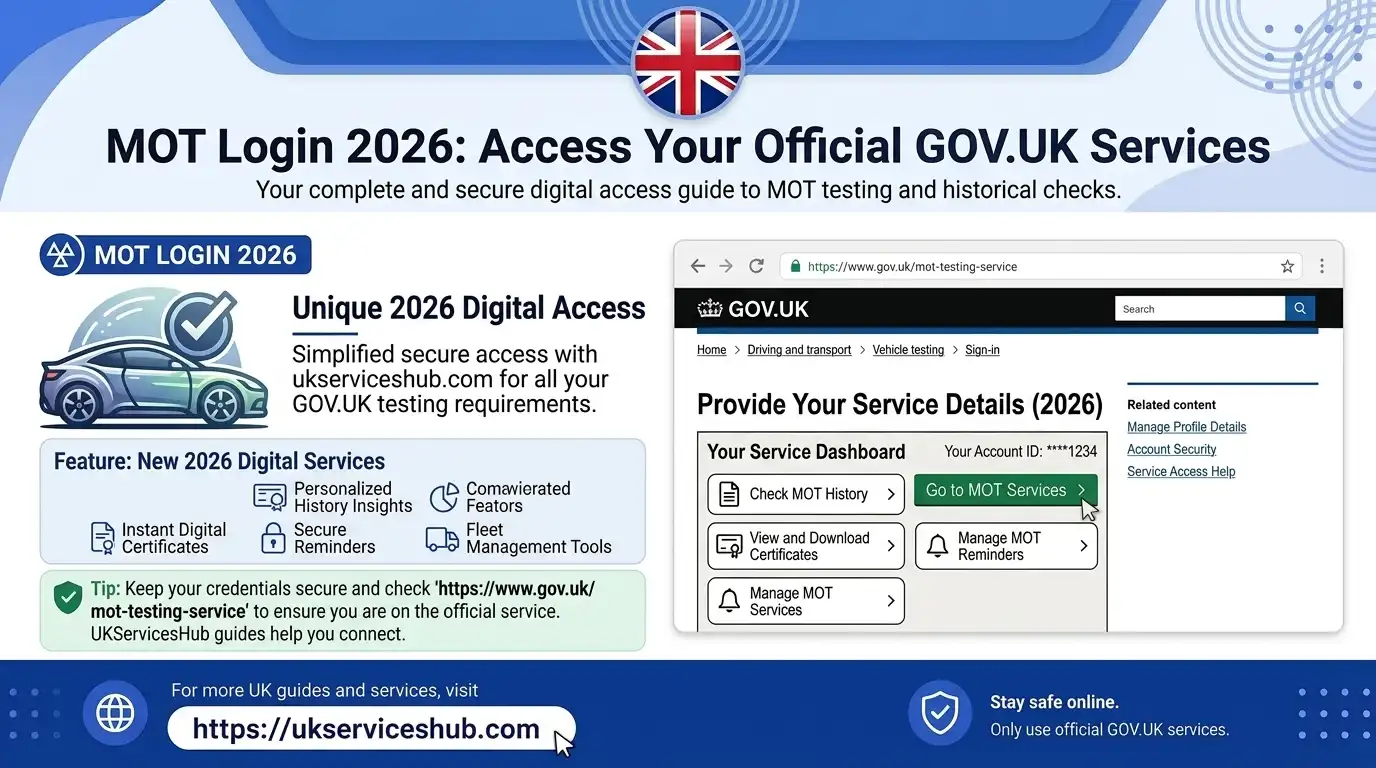
MOT Login is the official sign-in route for authorised users of the DVSA MOT Testing Service, while vehicle owners and buyers can use the public GOV.UK service to check a vehicle’s MOT status and history. These services have different purposes, so knowing which one you need can save time and prevent common login confusion.
The official MOT Testing Service allows authorised MOT users to access professional testing functions, while the public MOT check online service lets anyone check available vehicle information using the registration number. This guide covers the MOT Login, GOV.UK MOT Testing Service, MOT status checks, MOT history and common access issues in 2026.Visit our homepage for more information Click Here
What Is MOT Login?
MOT Login is the official sign-in route for authorised users of the DVSA MOT Testing Service. It is designed for MOT testers, testing stations and other approved users who need access to professional MOT-related functions.
The MOT Testing Service allows authorised users to perform tasks such as recording MOT test results, printing MOT certificates, buying MOT test slots and checking their testing-station balance.
It is important to understand that the MOT Login page is different from the public GOV.UK vehicle checking service. If you are a vehicle owner or buyer who simply wants to check MOT status, you do not need professional login details. You can use the public GOV.UK MOT service and search using the vehicle registration number.
So, MOT Login is mainly for authorised MOT professionals, while the public MOT check is available for people who want to view a vehicle’s current MOT status or history.
What Does the MOT Login Page Do?
The MOT login page is part of the government’s MOT Testing Service. It is primarily used by authorised MOT professionals rather than ordinary motorists.
Through the service, approved users can carry out professional MOT-related tasks, including recording test results, updating examiner information and checking or purchasing MOT testing slots.
You therefore shouldn’t try to create a tester account just to find out whether your car has passed its MOT.
Which MOT Service Should You Use?
| GOV.UK service | Intended user | Login needed? | Main purpose |
|---|---|---|---|
| MOT Testing Service | Authorised testers and testing stations | Yes | Manage and record MOT testing |
| MOT History | Vehicle owners and the public | No | View previous MOT results |
| MOT Status | Vehicle owners and the public | No | Check current MOT validity |
| MOT Reminders | Vehicle owners and the public | No account required for basic registration | Receive MOT reminders |
Quick tip: If your only question is “Does my car have a valid MOT?”, go directly to the public GOV.UK vehicle checker instead of the professional MOT login page.
How to Sign In to the Official MOT Testing Service
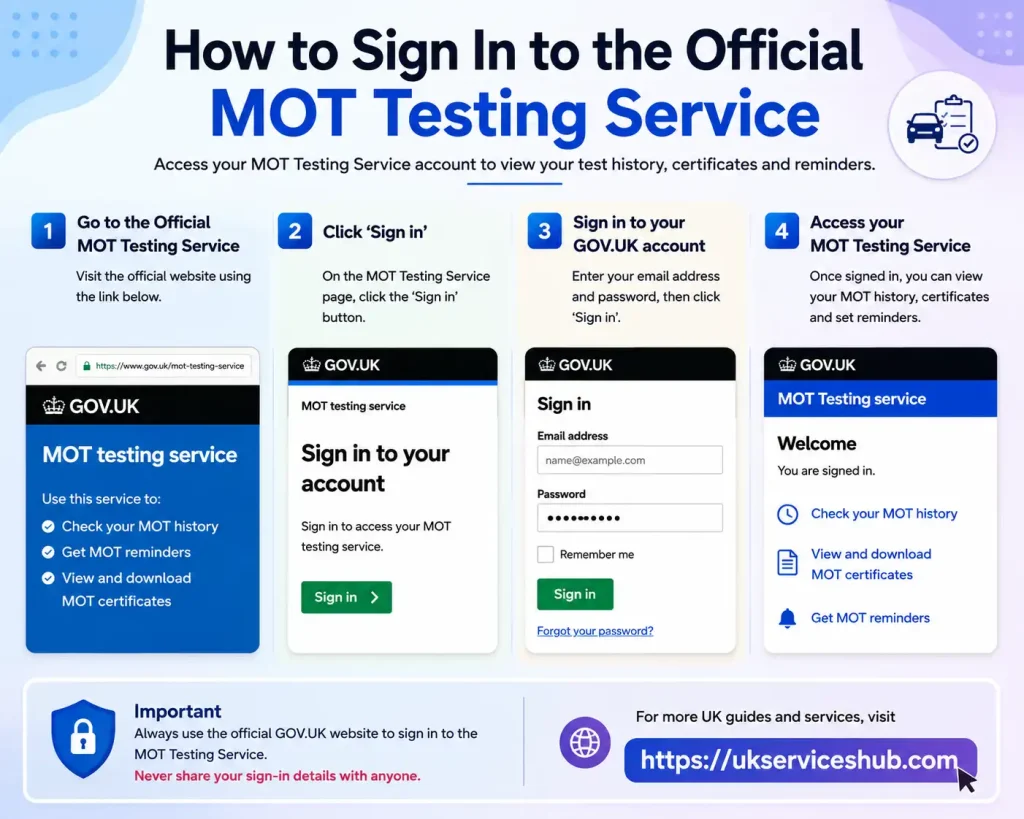
The official MOT login is reserved for authorised users of the DVSA MOT Testing Service. This includes MOT testers, site managers, authorised examiners and other approved users who have been given the relevant account permissions.
Once signed in, authorised MOT users can carry out tasks such as recording test results, printing MOT certificates, purchasing test slots and checking their testing-station balance.
Official MOT login:
Step 1: Go to the Official Login Page

Open the official DVSA MOT Testing Service using the link above.
Take care when searching for the service online. Avoid entering your MOT account details on unofficial websites or pages that are not part of the government service.
Step 2: Provide Your User ID
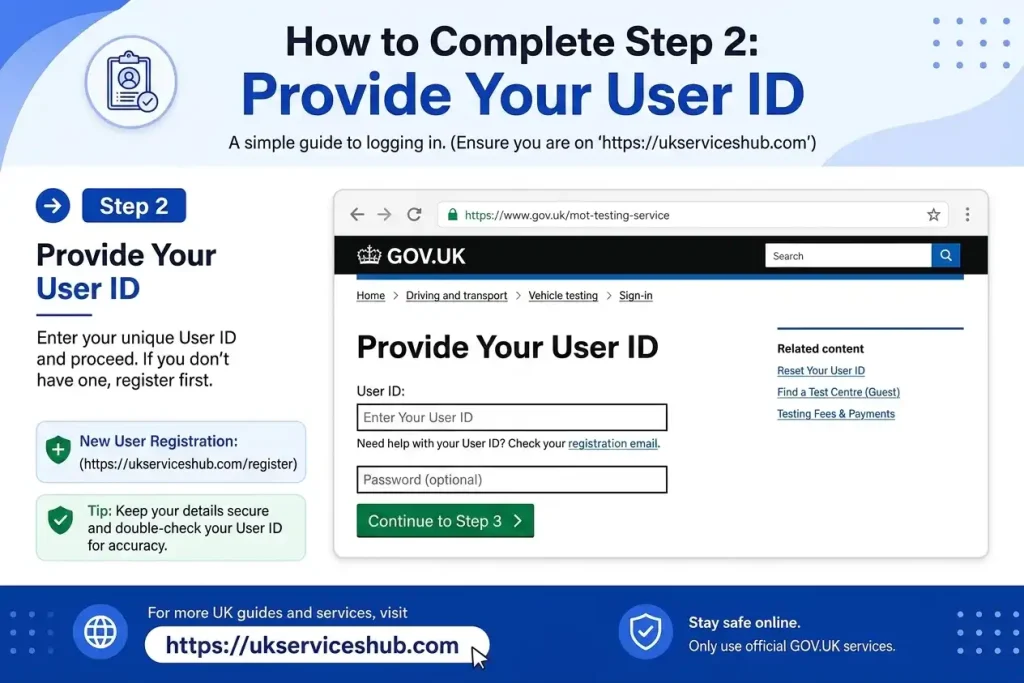
Enter the user ID associated with your MOT Testing Service account.
Your access and available functions are determined by the role assigned to your account.
Step 3: Enter Your Password
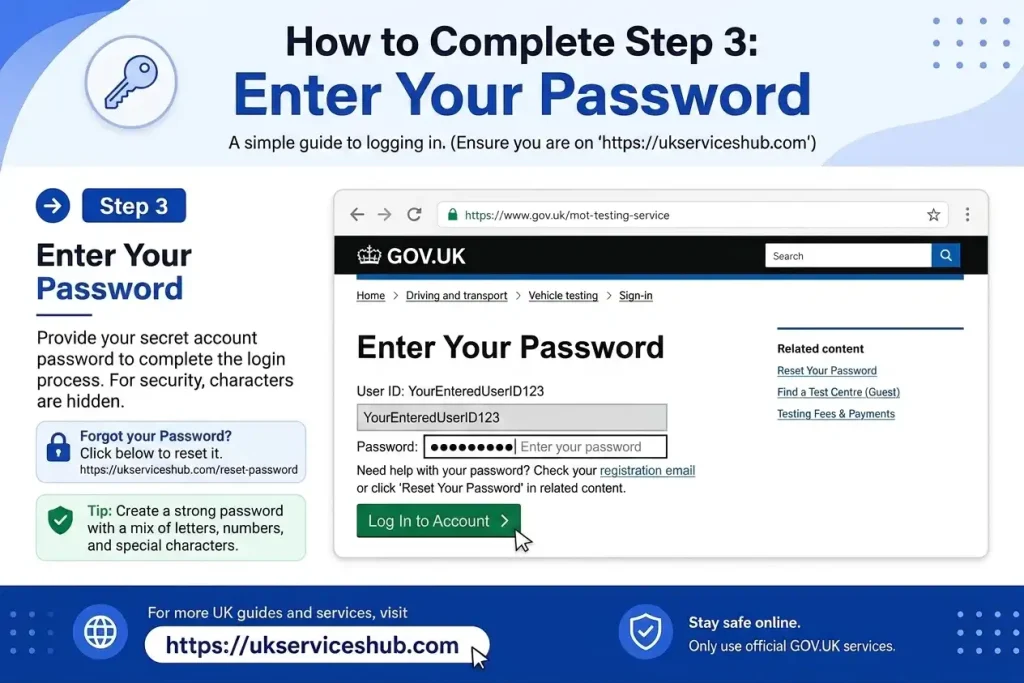
Type your MOT Testing Service password into the relevant field.
Keep these credentials private. DVSA guidance states that account holders should protect their login details and must not let another person use their account.
Step 4: Complete the Authentication Check
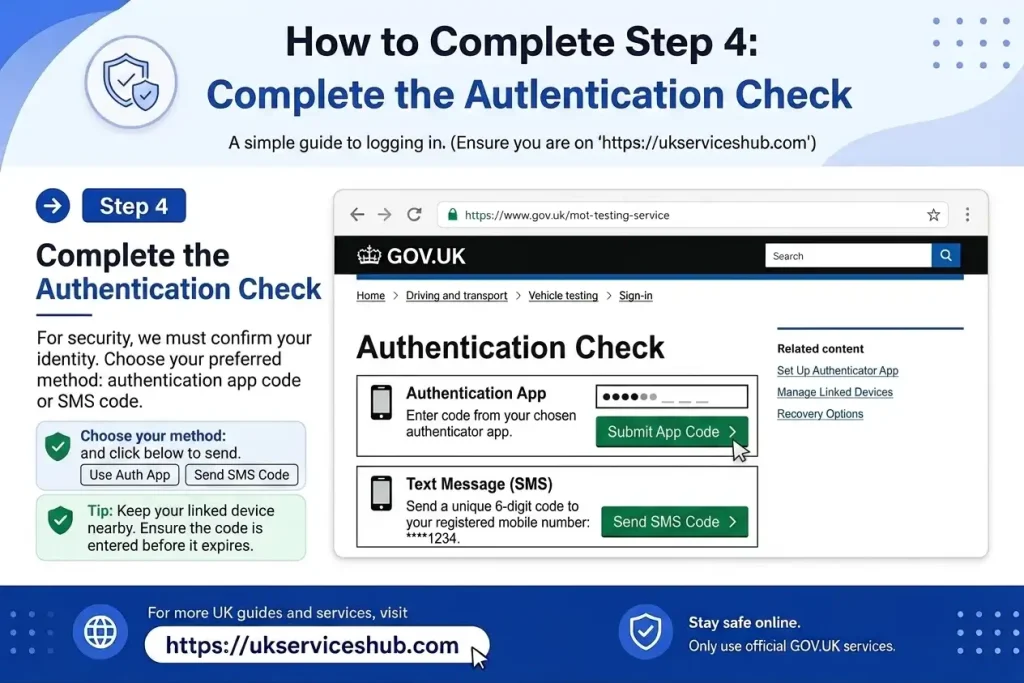
An additional authentication code is required when accessing the MOT Testing Service.
The current system supports two authentication methods: an authentication app and email authentication. DVSA recommends using an authentication app because it provides the more secure option.
Step 5: Open Your Available MOT Services

After your credentials and authentication have been successfully verified, you’ll be taken into the MOT Testing Service.
The options available to you depend on your assigned role. DVSA lists roles such as Authorised Examiner Principal, Designated Manager, Delegate, Consultant, Site Manager, Tester, Quality Control and Site Admin.
How to Check Your MOT Status Online
A public MOT check online doesn’t require the professional login system. GOV.UK provides a separate service where you can search for a vehicle’s current MOT information using its registration number.
1. Go to the Correct GOV.UK Service
For a current MOT status check, open:
If you want to see previous MOT tests as well, use:
Choosing the right page first saves time, particularly if you initially searched for MOT login.
2. Enter the Vehicle Registration
Type the vehicle’s registration number into the GOV.UK checker as requested.
For a standard public MOT check, you don’t normally need:
The registration number is the key information used to locate the vehicle’s available MOT records.
3. Submit the Vehicle Search
Once you’ve entered the registration number, continue with the search. The government service will retrieve the MOT information associated with that vehicle.
There is no need to use the professional MOT Testing Service login for this process.
4. Check the Result
The result tells you whether the vehicle currently has a valid MOT and shows the date when its MOT expires.
This is particularly useful when you’re:
The public GOV.UK service is designed to make this information accessible without requiring the login credentials used by authorised MOT testers.
How to Check MOT Online and See a Vehicle’s Full MOT History
A basic MOT status search confirms whether a vehicle currently has a valid test. But if you’re researching a second-hand car, checking its background, or simply want more detail, a full MOT check online is much more useful.
The official GOV.UK MOT history service lets you look through previous test records, including pass and fail results, recorded mileage, test dates, defects and advisories. This gives you a clearer picture of how the vehicle has performed over time.
MOT History Check: Step-by-Step
1. Open the GOV.UK MOT History Service
Start with the official government service:
You don’t need to use the professional MOT login to access the public history checker.
2. Enter the Vehicle Registration
Type the vehicle’s registration number into the search field. The number plate is required to locate the available MOT records.
3. Run the Search
Submit the registration details and wait for the vehicle’s MOT information to appear.
4. Examine the Previous Results
Work through the available tests and check whether each one was recorded as a PASS or FAIL.
Looking at several tests together can reveal whether the vehicle has had recurring problems.
5. Compare Recorded Mileage
Check the mileage shown against different MOT dates. This can be particularly helpful when you’re assessing a used vehicle.
Mileage recorded during MOT tests is useful historical evidence, although it shouldn’t be treated as a standalone guarantee of the vehicle’s actual mileage.
6. Look at Defects and Advisories
Previous records may contain defects or advisories identified during testing. Pay attention to repeated issues because they can indicate areas that have needed attention over time.
7. Confirm the Latest MOT Expiry
Finally, check the most recent record and note the current MOT expiry date. This helps you establish whether the vehicle is presently covered by an MOT.
How Far Back Does the MOT Record Go?
The official GOV.UK service provides MOT results for cars, motorcycles and vans from 2005 onwards. For HGVs, trailers, buses and coaches, records are available from 2018 onwards. Northern Ireland follows different record availability, with results available from 2017.
What Does a GOV.UK MOT Check Show?
A GOV.UK MOT check offers much more than a simple valid-or-expired result. Depending on the vehicle and the records available, you can review several useful details.
MOT Pass or Fail Result
Each available test normally indicates whether the vehicle passed or failed.
Reviewing the results chronologically can help you spot patterns. For instance, repeated failures for similar problems may be a reason to arrange a closer mechanical inspection before purchasing the vehicle.
Recorded Mileage
The MOT history includes mileage recorded when tests were carried out.
If you’re considering a second-hand vehicle, comparing these figures across different years can help you assess whether the mileage history appears consistent. Even so, MOT mileage should be considered alongside other vehicle records and evidence.
Previous Test Dates
The service shows the dates on which MOT tests took place.
This allows you to see the vehicle’s testing pattern and understand when previous inspections occurred.
Current MOT Expiry
The latest MOT information can show the date on which the current test expires.
GOV.UK states that most vehicles require their first MOT by the third anniversary of registration, although some vehicle types follow different requirements. After that, applicable vehicles generally require regular annual testing.
Defects and Advisories
Previous MOT records can also show problems identified during testing.
These may include dangerous, major, minor and advisory items, depending on the result and the issue recorded.
MOT Defect Categories Explained
Understanding the terminology used in an MOT record can make your online vehicle check much easier to interpret.
Dangerous Defects
A dangerous defect indicates a serious problem that presents an immediate risk to road safety.
If a vehicle receives this type of defect, it should not be treated as safe to drive simply because you have found its MOT record online. The underlying problem needs to be dealt with.
Major Defects
A major defect is a significant issue that results in an MOT failure.
Where driving restrictions apply, the vehicle needs to be repaired before it can legally or safely be used on the road.
Minor Defects
A minor defect does not necessarily result in an MOT failure. However, it identifies an issue that may require attention or monitoring.
A minor problem can sometimes be an early indication that a component is beginning to wear.
Advisories
An advisory highlights something that may need attention in the future.
When researching a used car, repeated advisories can be worth investigating. If the same component or issue appears across several MOT records, consider asking the seller about it or arranging an independent inspection.
A vehicle can pass its MOT while still having minor or advisory items recorded.
Why an MOT History Check Matters When Buying a Used Car
Running an MOT check online before purchasing a used vehicle gives you useful historical information before you commit your money.
A sensible review should include:
Suppose several previous tests contain advisories relating to tyres, brakes, suspension or another component. That doesn’t automatically mean the vehicle is unsuitable, but it may justify asking questions or getting a professional inspection.
The MOT history should therefore be viewed as one part of your used-car research. It can reveal useful information, but it does not replace an independent mechanical inspection.
How to Get a Copy of an MOT Certificate
The GOV.UK MOT history service also provides an option to download copies of current and previous MOT certificates.
Follow These Steps
Step 1: Open the official GOV.UK MOT history service.
Step 2: Enter the vehicle’s registration number.
Step 3: Select the relevant MOT record from the vehicle’s history.
Step 4: Use the available download option to obtain the certificate.
Can You See Where an MOT Test Took Place?
For vehicles tested in England, Scotland or Wales, GOV.UK says you may also be able to view the location where each MOT was carried out.
To access this additional information, you need the 11-digit number from the vehicle’s V5C logbook.
This can be useful when reviewing a vehicle’s records in greater detail, especially if you’re checking documentation alongside its online MOT history.
Do You Need an MOT Login to Check a Vehicle?
No — a public MOT check does not require an MOT login.
If you’re a vehicle owner, prospective buyer, student, foreign resident or simply someone checking a vehicle’s MOT details, you don’t need access to the professional MOT Testing Service.
The public GOV.UK vehicle checker is designed for anyone who wants to check MOT status. In most cases, you only need the vehicle’s registration number to find the available MOT information.
The MOT login serves a different purpose. It is intended for authorised users who access the professional MOT Testing Service to carry out approved testing-related tasks.
Which One Should You Use?
If you arrive at an MOT login screen but your intention is only to find out whether a vehicle has a valid MOT, don’t try to sign in or create professional credentials.
Instead, return to the public GOV.UK MOT checking service and search using the vehicle registration number. This is the appropriate route for checking a vehicle’s MOT status and available history.
MOT Login Authentication Changes for 2026
Professional users should be aware of a significant authentication change introduced in 2026.
From 25 June 2026, physical security cards are no longer used to sign in to the MOT Testing Service. DVSA instructed users to switch to either an authentication app or email authentication.
As a result, older MOT login instructions that still recommend a physical security card may no longer apply.
Authentication Apps Recommended by DVSA
For MOT professionals, setting up an authentication app is the recommended approach.
DVSA’s guidance gives examples such as:
After selecting an authentication app, you can connect it to your MOT Testing Service account through your profile or account settings. Once linked, the app generates the security code required during the MOT login process.
Why Use an Authentication App?
An authentication app provides an additional security layer beyond your user ID and password. DVSA recommends this method as the most secure authentication option for accessing the MOT Testing Service.
Using Email Authentication for MOT Login
Email authentication is another available option for authorised MOT users.
When you select email authentication, the MOT Testing Service sends a security code to the unique email address registered to your account. DVSA states that users who authenticate by email need to complete this authentication process each time they sign in.
For account security, the email address connected to your MOT account should be personal and accessible only by you.
How to Set Up an Authentication App
If you’re an authorised MOT user and haven’t yet linked an authentication app, you can configure one through your MOT Testing Service profile.
Step 1: Sign In to Your MOT Account
Start by accessing the MOT Testing Service with your existing user ID and password.
Step 2: Open Your Profile Settings
Once inside the service, navigate to your account or profile section.
Step 3: Choose the Authentication App Option
Select the setting that allows you to configure an authentication app.
Step 4: Connect the App to Your Account
Follow the three instructions displayed by the MOT Testing Service to link your chosen authentication app.
Step 5: Enter the Generated Code
Your authentication app will produce a six-digit security code. Enter this code when the MOT system asks you to confirm the setup.
Once the configuration has been completed successfully, you can use the authentication app to generate security codes for future MOT login attempts. DVSA recommends this method as the most secure way to authenticate your MOT Testing Service account.
Who Is Eligible to Access the MOT Testing Service?
The professional MOT Testing Service isn’t an open public portal. Access is limited to people who have been authorised and assigned an appropriate role within the MOT system.
The DVSA MOT testing guidance identifies several roles that may be given access, including:
What a user can see and do after MOT login depends on the permissions attached to their role. Having the official login address alone doesn’t give someone access to tester functions or allow them to create a professional account as a member of the public.
What Can You Do After an MOT Login?
Once an authorised user successfully signs in, the MOT Testing Service provides access to a range of professional functions.
According to GOV.UK, these include the following:
Record MOT Test Results
One of the main functions is recording the outcome of MOT tests performed by authorised testers. The result is entered into the official MOT system after the vehicle has been tested.
Print MOT Certificates
Testing stations can use the service to print MOT certificates following an MOT test.
Purchase MOT Test Slots
Authorised users can also use the system to buy MOT test slots required for their testing activities.
View Testing-Station Balance
The service provides access to the testing station’s available balance for users who have the appropriate permissions.
Other tools and features may appear depending on the user’s assigned role and level of access.
MOT Login Problems: What Can You Try?
Reaching the MOT login page doesn’t always mean you’ll be able to sign in immediately. The correct solution depends on whether you’re using the wrong service, have forgotten your credentials or are experiencing an authentication problem.
1. You’re Trying to Check a Car as a Driver
If you’re a normal vehicle owner and searched for MOT login because you want to know whether your car has a valid MOT, you’re probably on the wrong page.
You don’t need professional MOT credentials for a public vehicle check.
Use the official services instead:
Enter the vehicle registration number and follow the on-screen instructions.
2. You’ve Forgotten Your Password
Authorised MOT users who can’t remember their password should use the recovery facilities provided by the official service.
Creating a second account isn’t the recommended solution. DVSA guidance states that users should have one MOT Testing Service user ID and keep their account credentials secure.
If the available recovery process doesn’t restore your access, contact the official MOT Testing Service Desk.
MOT Testing Service Desk: 0330 123 5654
Opening hours: Monday to Friday, 8am to 5pm
3. Your Authentication Code Is Being Rejected
An incorrect or expired security code can prevent a successful MOT login.
Check these points:
DVSA stresses the importance of keeping authentication information secure and preventing other people from accessing your account or authentication method.
4. Your Old Security Card Doesn’t Work
If you’re following an older article that tells you to use a physical security card for MOT login, the information may now be out of date.
Physical security cards stopped working for MOT Testing Service sign-in from 25 June 2026. Users were instructed to move to either an authentication app or email-based authentication.
Because of this change, older instructions referring to security cards should no longer be relied upon for current MOT Testing Service access.
5. You’re Not Receiving the Email Authentication Code
Users who choose email authentication may occasionally have trouble receiving their security code.
Before contacting support, check:
If the code still doesn’t arrive, contact the MOT Testing Service Desk for assistance.
Your registered email should also be personal and accessible only to you rather than a shared workshop or office address. This helps reduce the risk of another person accessing your authentication information.
Keep Your MOT Login Secure
Because an MOT account can provide access to professional testing functions, protecting your credentials is essential.
Don’t Give Anyone Your Password
Your password should remain private. DVSA guidance states that neither DVSA nor the MOT Service Desk should ask you to disclose it.
Use Your Own MOT Account
Don’t allow colleagues or other testers to sign in using your personal account. Each authorised user should use their own credentials.
Protect Your Authentication Device
If your authentication app is installed on a phone or tablet, make sure the device itself is protected from unauthorised access.
Secure Your Email Account
Email security also matters if you use email authentication. Someone who gains access to your email could potentially obtain authentication codes or use account recovery features.
Be Careful on Shared Computers
If you use a workshop or shared computer to access the MOT Testing Service, don’t leave your credentials saved where another person could access them.
MOT Login or MOT Check Online: Which Service Is Right?
The quickest way to choose the correct service is to start with your goal.
| What you need to do | Service to use |
|---|---|
| Find out whether a car has a valid MOT | GOV.UK MOT Status |
| See previous MOT tests | GOV.UK MOT History |
| Review MOT mileage records | GOV.UK MOT History |
| Download an MOT certificate | GOV.UK MOT History |
| Record a completed MOT test | MOT Testing Service |
| Print an MOT certificate as an authorised tester | MOT Testing Service |
| Purchase MOT test slots | MOT Testing Service |
| Access professional MOT functions | MOT Testing Service |
So, if you searched MOT login because you simply want to check your own vehicle, the professional testing portal isn’t what you need. The public GOV.UK MOT check is the appropriate option.
What to Do When Your MOT Is Near Expiry
After you check MOT status, make a note of the expiry date shown by the official service.
If your vehicle requires an MOT, arrange the next test before the current one expires. GOV.UK provides both the vehicle checking service and guidance on getting an MOT.
If the vehicle fails its test, what you can do next depends on the circumstances of the failure and the defects recorded.
Serious defects should always be dealt with before the vehicle is used on the road.
What Does an MOT Failure Mean?
An MOT failure doesn’t necessarily mean the vehicle can never be used again. The test record will identify the issues that caused the failure and may also list other problems that need attention.
MOT records can include:
Dangerous and major defects deserve particular attention because they can have a significant effect on vehicle safety.
Once the required repairs have been completed, the vehicle may need a retest depending on the circumstances.
For the most reliable information about a particular failed MOT, review the official MOT record and follow the advice provided by the testing station and GOV.UK.
Why a GOV.UK MOT History Check Is Useful for Used Cars
If you’re considering a second-hand vehicle, carrying out a GOV.UK MOT check is a useful part of your initial research.
The available history can help you examine:
However, an MOT record shouldn’t be treated as a substitute for a full vehicle inspection. A car may have a valid MOT while still having mechanical or maintenance issues that aren’t covered by the MOT test.
For a more informed buying decision, check the service history, inspect the vehicle carefully and consider arranging an independent mechanical inspection before completing the purchase.
How to Get an MOT Reminder
If you often forget when your vehicle’s MOT expires, GOV.UK offers an official MOT reminder service.
You can sign up to receive a reminder when your MOT is due. This can help drivers avoid accidentally letting their vehicle’s MOT expire.
You can access the official service here:
Before signing up, check that the vehicle registration and contact details you enter are correct.
An MOT reminder does not replace checking your vehicle yourself. You can still use the public MOT check online service whenever you want to confirm the current MOT status.
How Often Should You Check Your MOT Status?
You do not need to check your MOT record every day or every month. However, checking it at useful times can help prevent unexpected problems.
You should consider performing a check MOT status search:
A quick search using the registration number can confirm the current MOT information without requiring the professional MOT login.
Can Foreign Residents Check a UK Vehicle’s MOT?
Yes. If a vehicle has MOT information available through the UK system, a member of the public can use the GOV.UK service to search its record.
You do not need to be a UK citizen or an MOT tester simply to perform a public vehicle search.
For example, someone considering purchasing a UK-registered vehicle can use the MOT check online service to review the available testing information before making a decision.
The important requirement is having the vehicle’s registration number.
Can Students Check MOT Online?
Yes.
Students who own or are considering buying a vehicle in the UK can use the public GOV.UK service without accessing the professional MOT login.
A student buying a used car can use the MOT history to check:
This can help with basic research before purchasing a vehicle.
MOT Check Online for Used-Car Buyers
A used-car buyer should not rely only on the seller’s description of a vehicle.
Instead, complete your own GOV.UK MOT check.
Recommended Checking Process
1. Ask for the registration number
Use the registration number to access the vehicle’s public MOT information.
2. Check the current MOT
Confirm whether the vehicle currently has a valid MOT and check when it expires.
3. Review the history
Look through previous MOT tests rather than checking only the latest result.
4. Compare the mileage
Check whether the mileage progression appears reasonable.
5. Read previous advisories
Repeated advisories can provide useful clues about the vehicle’s maintenance.
6. Check failed tests
A history containing several failed tests deserves closer attention.
7. Inspect the actual vehicle
The online MOT record should be treated as one part of your research and not as a replacement for a professional inspection.
What Does an MOT Pass Mean?
An MOT pass means the vehicle met the required standards for the items checked during that particular MOT test.
It does not mean that every component of the vehicle is perfect.
The MOT is a legal roadworthiness test that covers specified vehicle safety and environmental requirements.
Therefore, a vehicle can have a valid MOT while still requiring normal servicing or maintenance.
For this reason, you should review the complete MOT history rather than treating the word “PASS” as a complete condition report.
What Are MOT Advisories?
Advisories identify items that may need attention but do not necessarily cause the vehicle to fail its MOT.
For example, an advisory may identify wear that has not yet reached the failure threshold.
When carrying out an MOT check online, pay attention to repeated advisories.
A single advisory may be relatively minor, but several similar advisories appearing over multiple years may indicate that maintenance has repeatedly been postponed.
Does MOT History Show the Car’s Complete Repair History?
No.
The GOV.UK MOT record is not the same as a complete service history.
It can show MOT-related information such as test results, mileage and defects, but it does not necessarily include every repair, service or maintenance job carried out on the vehicle.
When buying a used car, ask the seller for additional documentation, such as:
A complete buying decision should combine these records with the GOV.UK MOT check.
Frequently Asked Questions About MOT
Conclusion
Accessing the MOT Testing Service through the official GOV.UK website is the safest way to manage your MOT information. Whether you need to log in to the MOT Testing Service, check your MOT status, view MOT history, download certificates, or set MOT reminders, always make sure you are using the official GOV.UK service.
For the latest guidance on MOT login, MOT checks, testing services, and other UK online services, follow the step-by-step information provided in this guide. Always verify the website address before entering your login details and never share your password or account information with anyone.