DBS Update Service 2026 Registration Login Certificate Checks & Renewal Link
DBS Update Service makes it easier for people with a Standard or Enhanced DBS certificate to keep their certificate up to date and support future employment checks. Instead of applying for a new DBS certificate whenever you move to another eligible role, the service allows an authorised employer to check whether there has been any relevant change to your existing DBS status.
The DBS Update Service is operated by the Disclosure and Barring Service (DBS) and is available through the official GOV.UK service. For most applicants, the subscription costs £16 per year, while eligible volunteers can use the service free of charge.
In this complete guide, you’ll learn how the DBS Update Service works, who can register, how to complete DBS Update Service registration, how to log in and manage your account, how employers carry out certificate checks, and what you should know about renewal and using your DBS certificate for a new role.Visit our Homepage for more information.Click Here
What Is the DBS Update Service?
The DBS Update Service is an online subscription that helps applicants keep an eligible DBS certificate up to date. It also gives employers and other legally entitled organisations a way to carry out an online status check with the certificate holder’s permission.
It is important to understand that the service does not issue a new DBS certificate. Instead, it allows an organisation to check whether relevant information has changed since the certificate was issued.
The service is currently available for:
A Basic DBS check cannot be added to the Update Service. People with Basic checks need to use the appropriate online services account instead.
DBS Update Service at a Glance
| Feature | Current information |
|---|---|
| Eligible checks | Standard and Enhanced |
| Annual subscription | £16 |
| Eligible volunteers | Free |
| Payment method | Debit or credit card |
| Subscription period | 12 months |
| Join during application | Yes |
| Join after certificate is issued | Within 30 days of the issue date |
| Employer status check | Free |
| Employer registration | Not required for a status check |
The subscription begins from the date the DBS certificate is issued. The official applicant guidance confirms that the annual subscription is £16 and free for people who meet the DBS definition of a volunteer.
Who Should Consider Using It?
The service is particularly useful for people who regularly work in positions where a Standard or Enhanced DBS check is required. This can include workers in education, healthcare, childcare, voluntary organisations and other regulated or eligible roles.
It can also be useful when someone changes employers but continues in a role that requires the same workforce and the same level of DBS check.
For example, if you have an Enhanced DBS certificate for the Child Workforce and a new employer requires an Enhanced certificate for the same workforce, the Update Service may allow the employer to check your existing certificate status rather than requiring you to start the entire DBS application process again.
However, portability is not unlimited. An employer may still require a new DBS check if the role requires a different workforce or a different level of check.
Important: Joining the Update Service does not guarantee that every future employer will accept your existing certificate. The organisation recruiting you decides what level and type of DBS check is appropriate for the role.
What You Need Before Registering
There are two main ways to join the service. The information you need depends on whether your DBS application is still being processed or your certificate has already been issued.
If Your DBS Application Is Still in Progress
You can join using your DBS application form reference number, sometimes called the form ref.
If your application was submitted electronically through an e-bulk Registered Body, you may instead receive an e-reference number. The organisation handling your application can provide the relevant reference if you do not have it.
There is a crucial timing requirement: once you join using the application reference, DBS must receive the application form within 28 days. If the application is not received within that period, the subscription can fail.
If You Already Have Your DBS Certificate
If your Standard or Enhanced certificate has already been issued, you can join the service using the certificate number.
You must register within 30 calendar days of the date of issue printed on your certificate. The 30-day period is important, so check the certificate before starting the registration process.
If you miss this period, you cannot simply join later with the same certificate. You may need to obtain a new DBS check through the organisation you are working for before joining the service.
How to Register for the DBS Update Service
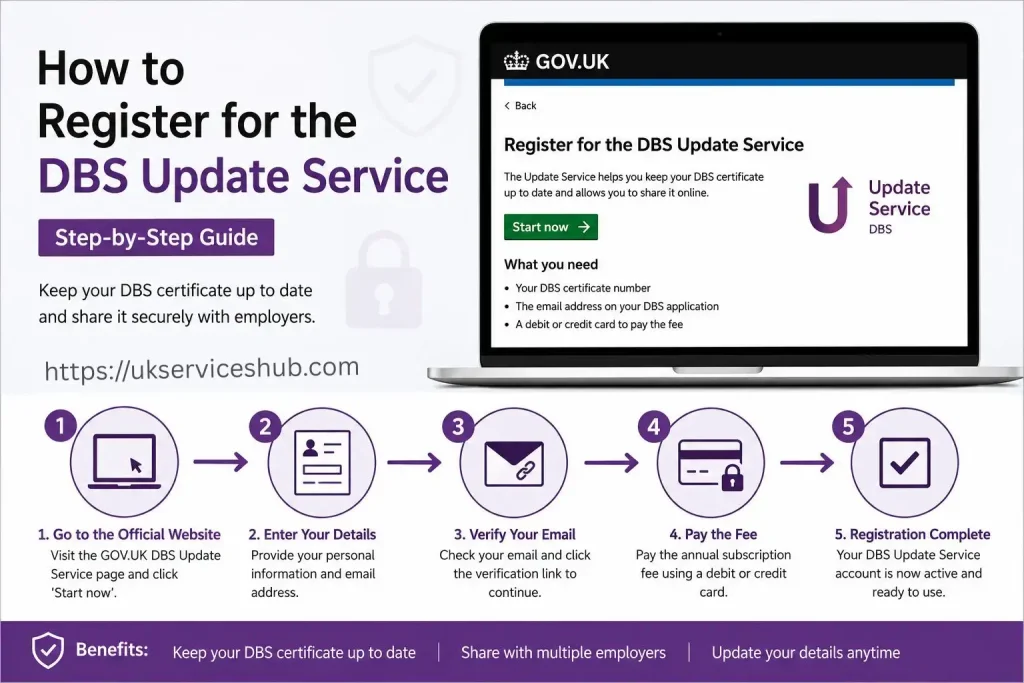
The registration process is completed through the official government service rather than a third-party website.
Step 1: Open the Official GOV.UK Service
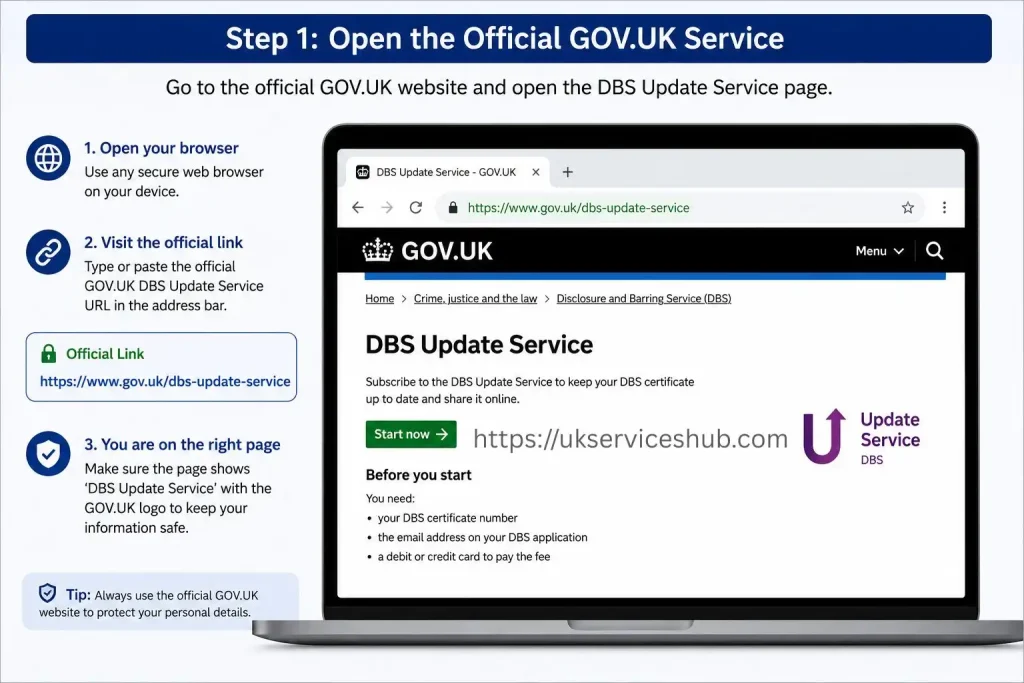
Start with the official GOV.UK DBS Update Service page.
From there, follow the option to register for the Update Service. Using the GOV.UK page is the safest way to reach the correct government service and avoid unofficial websites.
Step 2: Choose the Correct Registration Route
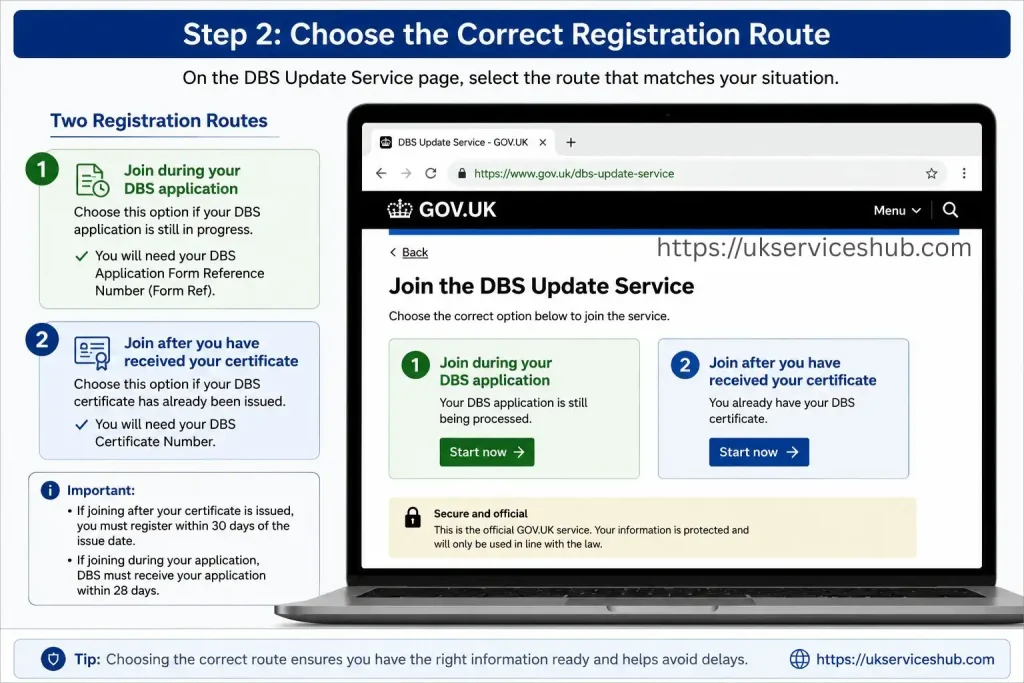
Your next step depends on your DBS application.
If you are still waiting for your DBS certificate, use your application form reference number.
If your certificate has already arrived, use the DBS certificate number, provided you are still within the 30-day registration period.
Do not confuse the application reference with the certificate number. They are used at different stages of the process.
Step 3: Enter Your Personal Details
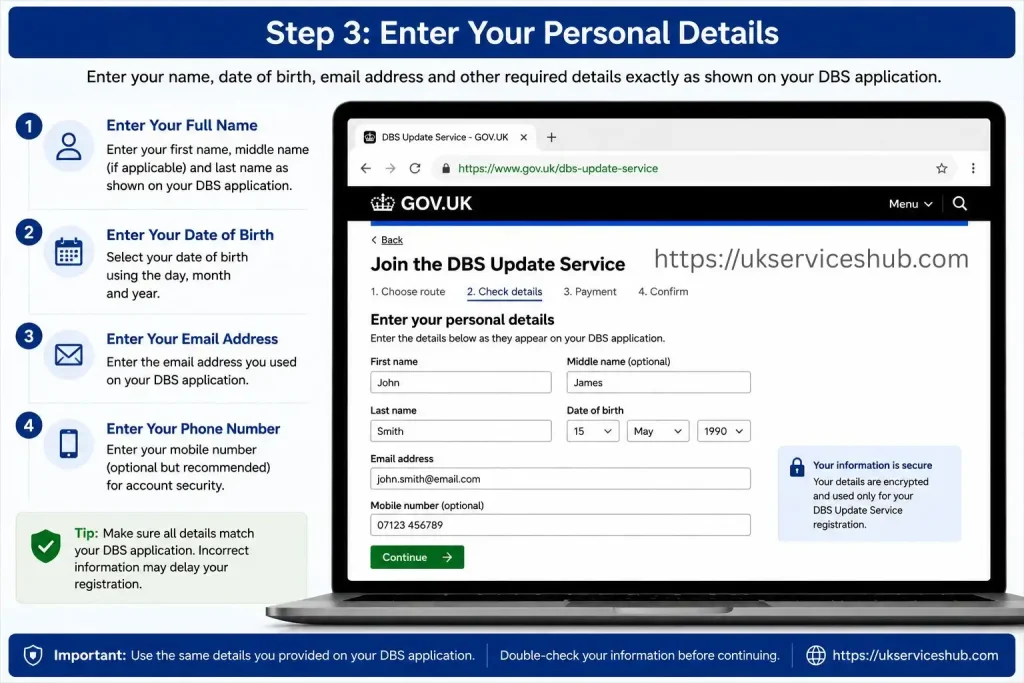
Enter the requested information carefully and make sure it matches the information connected to your DBS application or certificate.
You may need information such as your:
The official applicant guidance recommends using a personal email address for the Update Service subscription.
Step 4: Pay the Annual Subscription
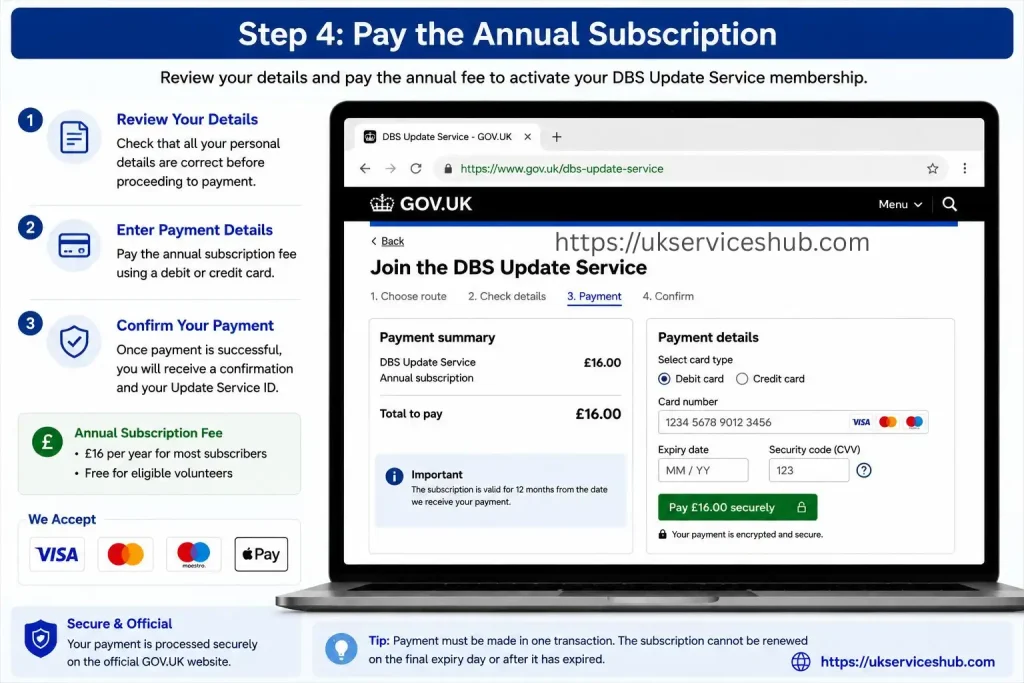
The standard Update Service subscription costs £16 per year.
Payment is made by debit or credit card. If you qualify under the DBS definition of a volunteer, the subscription is free.
If another person pays using their card with permission, the payment can still be made, but keeping control of your own Update Service account is important. The official guidance states that applicants should have control of their subscription and associated account details.
Step 5: Keep Your Update Service ID Safe
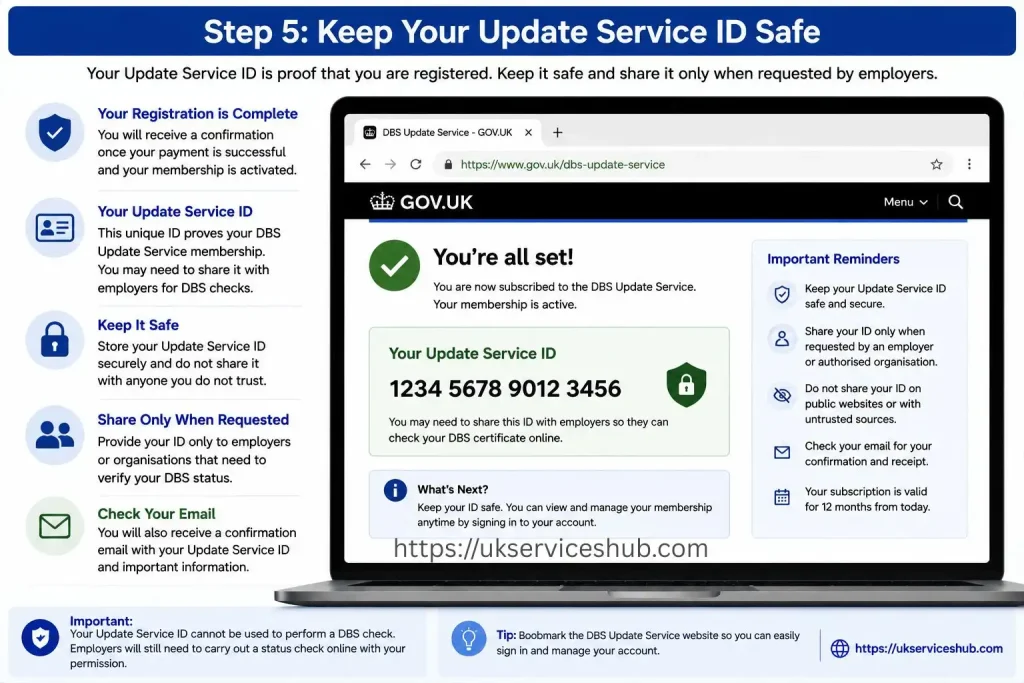
After registration, you receive a unique Update Service ID. The official applicant guidance states that this ID begins with the letter C followed by 10 numbers.
Keep the ID somewhere secure because you need it when accessing your account.
Do not casually share your login credentials or Update Service ID with other people.
Can You Register Before Your DBS Certificate Is Issued?
Yes. This is one of the useful features of the service.
If you have the required application form reference number, you can join while your Standard or Enhanced DBS application is being processed. The DBS must then receive the application form within 28 days of the subscription being created. Once the certificate is issued, DBS will automatically add it to your Update Service account.
This means you do not have to wait for the physical certificate to arrive before joining, provided you have the correct application reference and meet the registration requirements.
A Simple Registration Timeline
DBS application submitted → application reference received → join Update Service → DBS receives application within 28 days → certificate issued → certificate added to account
Keeping this timeline in mind can prevent one of the most common registration mistakes: leaving the subscription until the certificate arrives and then forgetting the 30-day deadline.
DBS Online Account Login: How Access Works
Once you have registered, you can use the Update Service sign-in facility to manage your subscription and certificates.
The official Update Service sign-in system asks for your Update Service ID and date of birth, along with your password.
After signing in, you can manage important parts of your subscription, including your certificates and contact details.
The service allows registered users to:
What If You Forget Your Update Service ID?
The Update Service ID should be kept securely because it is required to access the account.
If you forget it, the official applicant guidance says you can contact DBS for assistance. The GOV.UK service currently lists DBS customer services for help with Update Service issues.
DBS customer services: 0300 0200 190
Before contacting support, have your relevant DBS information available so the service team can identify your account and help with the problem.
DBS Online Check: What Does It Actually Show?
A DBS online check is different from applying for a new certificate.
An employer or other legally entitled organisation can use the Update Service to check whether relevant information has changed since the DBS certificate was issued. The organisation must have the applicant’s permission and must be legally entitled to perform the check.
The check can provide an immediate status result.
Importantly, an employer should first inspect the applicant’s original DBS certificate and confirm that the certificate is the appropriate type and level for the position. Current employer guidance also states that original certificates must be checked in person; copies or viewing a certificate through a video link are not permitted for this purpose.
What Happens During a Status Check?
The organisation enters the relevant certificate details into the official DBS status-check service.
A valid status check can indicate whether the certificate remains current or whether new information means a new DBS check should be requested. The official service also provides more specific wording depending on whether the original certificate contained information.
The employer does not need to pay or register for an ordinary status check, but they must be legally entitled to conduct it and have the person’s permission.
How Employers Use the GOV.UK DBS Update Service
For employers, the Update Service can simplify repeat DBS checks when an applicant already has a suitable certificate linked to the service.
The employer should not treat the online result as a replacement for checking the original certificate. The certificate itself needs to be inspected first, including the applicant’s identity, the level of DBS check and the workforce for which the check was issued.
Once those details have been confirmed, the employer can carry out the online status check with the certificate holder’s permission.
Information Usually Needed
The employer uses details from the applicant’s DBS certificate, including:
The employer then receives the available status information through the official online checking service.
Understanding DBS Status Results
A DBS online check is designed to establish whether the information on an eligible certificate has changed since it was issued.
There are three important outcomes to understand:
| Status | What it indicates | What to do |
|---|---|---|
| Certificate is current | No new information has been identified since issue | The employer can consider the existing certificate, subject to its suitability for the role |
| Certificate is no longer current | Relevant new information has been added | A new DBS check may be required |
| Details do not match | The information entered does not correspond with the certificate | Recheck the certificate details and try again |
A current result does not automatically mean that the certificate is suitable for every job. The employer still needs to consider whether the certificate’s level and workforce match the requirements of the position.
That distinction is particularly important when someone changes employers or moves into a different type of role.
When Can a DBS Certificate Be Used for Another Job?
The Update Service is sometimes described as making a DBS certificate “portable”, but portability has limits.
Generally, an existing certificate can be considered for a new role where the new position requires the same level of DBS check and the same workforce.
For example:
Enhanced – Child Workforce → Enhanced – Child Workforce
may potentially be suitable for an online status check.
By contrast:
Enhanced – Child Workforce → Adult Workforce
does not meet the same workforce requirement.
Likewise, if the new position requires a different level or type of check, the employer may need to request a new DBS application.
Before Changing Jobs, Check These Three Things
Do not assume that having an active Update Service subscription means you never need another DBS check.
The employer remains responsible for deciding whether the existing certificate is appropriate for the role.
DBS Update Service Renewal
The subscription normally lasts for 12 months, so keeping track of the renewal date is essential.
The annual fee is £16 for applicants who are not eligible for the volunteer exemption. Eligible volunteers do not pay the subscription fee.
There are two ways the subscription can be renewed: automatic renewal or manual renewal.
Automatic Renewal
If automatic renewal has been selected, the DBS can attempt to take the annual payment from the saved payment card before the subscription expires.
This makes it important to keep your payment details current.
If your card has expired or been replaced, update the relevant payment information before the renewal attempt.
A failed payment can put your subscription at risk, so don’t wait until the final day to check your account.
Manual Renewal
You can also renew the subscription manually.
The renewal window opens before the subscription expires, allowing you to make the payment through your account.
One important point from the supplied guidance is that you cannot renew on the final expiry day or after the subscription has already expired.
If the subscription lapses, it cannot simply be switched back on. You may need to obtain a new DBS certificate through an employer and then register that new certificate for the Update Service.
Renewal Checklist
Before your subscription reaches its expiry date:
Tip: Don’t leave renewal until the last possible moment. A small payment or account problem is much easier to resolve while the subscription is still active.
What Happens If Your DBS Update Service Subscription Expires?
An expired subscription is different from an expired DBS certificate.
The Update Service subscription controls whether the certificate remains available through the online status-check system. If the subscription ends, you cannot simply pay later and restore the same subscription.
In that situation, the supplied guidance states that you would generally need to obtain a new DBS check through an employer and register the new certificate again.
This is why renewal reminders matter, especially for people who work in sectors where DBS checks are regularly required.
Can You Add More Than One DBS Certificate?
Yes. The Update Service can be used to manage additional eligible DBS certificates.
This can be useful for people who work across different settings or have more than one eligible certificate.
However, adding another certificate does not remove the requirement to make sure the certificate is appropriate for the particular role.
Before an employer relies on an existing DBS certificate, they should still check:
Common DBS Update Service Problems
Even when registration is straightforward, users can encounter problems with their account or certificate.
1. I Missed the 30-Day Registration Deadline
If your DBS certificate has already been issued, the supplied information states that you need to register within 30 calendar days of the certificate’s date of issue.
If that deadline has passed, don’t assume you can simply register the old certificate later.
Speak to the organisation handling your DBS requirements about whether a new DBS application is necessary.
2. My Certificate Is Not Showing
If you registered before the certificate was issued, there is normally a process linking the certificate to the subscription after DBS issues it.
Check that you used the correct application information during registration.
If the certificate still does not appear as expected, use the official DBS support route rather than creating multiple accounts.
3. I Cannot Access My DBS Online Account
If your DBS online account login is not working, first make sure you are using the official Update Service sign-in page.
Check the Update Service ID and date of birth carefully, then follow the available account-recovery instructions if you have forgotten your password.
Avoid entering your details into unofficial websites that claim to provide a DBS online check.
4. My Employer Says the Certificate Is Not Suitable
An active subscription does not automatically make a certificate suitable for a new position.
The new employer may require:
Ask the employer exactly which DBS check the position requires before assuming that your existing certificate can be used.
DBS Online Check vs New DBS Application
These two processes are often confused.
| DBS Update Service | New DBS Application |
|---|---|
| Checks the status of an existing eligible certificate | Produces a new DBS certificate |
| Used for eligible Standard and Enhanced checks | Used when an employer needs a new check |
| Employer status check is free | New DBS check involves the relevant application process |
| Requires an eligible certificate and active subscription | Started through the organisation requesting the DBS check |
| Can help with repeat checks where requirements match | Needed when an existing certificate is not suitable |
The key point is simple: the Update Service does not replace the DBS application process in every situation.
It is a way of maintaining and checking an eligible existing certificate.
How to Keep Your Account Secure
Your DBS Update Service account contains personal information, so basic account security matters.
Use a password that you do not reuse for unrelated websites. Keep your Update Service ID somewhere secure and do not give your account password to an employer or recruitment agency.
When accessing your DBS online account login, make sure the address belongs to the official government service.
If you receive an unexpected message asking for sensitive account information, avoid clicking unfamiliar links. Instead, open the GOV.UK DBS Update Service directly.
DBS Update Service: Key Points to Remember
The GOV.UK DBS Update Service is most useful when you regularly need an eligible Standard or Enhanced DBS check and want to make future status checks easier.
Before registering, remember these core rules:
These points are especially important for applicants who move between employers, work across multiple organisations or need regular DBS verification.
DBS Update Service Checklist for Applicants
Use this checklist before and after registration.
Before registering
☐ Confirm your DBS check is Standard or Enhanced
☐ Find your application reference or certificate number
☐ Check the certificate issue date if the certificate has already arrived
☐ Make sure you are within the relevant registration period
☐ Have your personal details available
☐ Have a debit or credit card ready if the £16 fee applies
After registration
☐ Save your Update Service ID
☐ Keep your password secure
☐ Check that your certificate has been linked correctly
☐ Keep your email and contact details current
☐ Monitor your subscription expiry date
☐ Check your payment details before renewal
☐ Give permission when an employer needs to perform a status check
This simple checklist can prevent the most common problems, particularly missed registration and renewal deadlines.
Frequently Asked Questions About the DBS Update Service
Conclusion
The DBS Update Service 2026 makes it easier to manage an eligible Standard or Enhanced DBS certificate without having to apply for a new check every time you change roles. By completing your DBS Update Service registration, you can keep your certificate connected to the service and allow eligible employers to carry out online certificate checks when required.
If you already have an account, the DBS Update Service login gives you access to your service details and helps you manage your certificate. Employers can also use the appropriate online checking process to confirm whether the information on a DBS certificate has changed. Remember that the Update Service does not replace a DBS certificate application in every situation, and eligibility requirements still apply.
For DBS certificate renewal, it is important to understand that the Update Service itself does not automatically renew your DBS certificate. Keeping your details and certificate information up to date and following the official DBS guidance can help you avoid unnecessary delays when a new check is required.
For the latest DBS Update Service registration, login, certificate check and renewal information, always use the official GOV.UK guidance to make sure you are following the current requirements and procedures.